
Understanding Ticket Priorities, Impact, Urgency, and Queuing
Here at Comprehensive Computer Consulting, also called “C3,” we sometimes find ourselves overloaded. A unique problem, we know, we’re working on it. But, seriously, it is a problem that we sometimes hide from our customers. We think of our customers as our friends and partners. The mission or vision of their business is important to us. We do everything we can to serve every customer as quickly as possible with the friendliest of faces, even when we’re on the phone. Because, really, that’s why we’re in the business we’re in, to partner with our customers and Make IT Easy. And, that’s how we end up hiding our state of being overwhelmed.
Unfortunately, though, some aspects of our situation spill over into our customer’s world. Despite the fact that Gartner recommends a ratio of 70 users to one technician, we average 256 users per employee, and 448 users per available technician. You might be asking yourself, “Why are your ratios so high?” Or, “How do you do it?” (Or, both.) They “why” is simple, to keep costs down. The “how” is a bit more complicated.
Systems to Save Us
In 2018, we averaged 86.1 tickets per technician per month. Some months, though, are as high as 118 tickets per technician per month. These numbers, include “easy” tickets, “moderate” tickets, and those pesky, time-consuming “difficult” tickets. On average, the easy-moderate-difficult distribution is about 80:10:10, but that last 10% can really throw us off, especially when they crop up in a month when each tech is handling 118 tickets; 94.4 “easy” tickets, 11.8 “moderate” tickets, and 11.8 “difficult” tickets. Based on standards and best practices, that breakdown should be 40:5:5. So, it’s probably not surprising that when the needle starts pointing up to 118, the staff begins feeling overloaded.
At C3, we rely heavily on systems to save us. We have lots of systems in place and we are constantly refining and streamlining our systems to maximize their effectiveness in help us deliver IT service to our customers.
Policy and Process
Some of our systems are simply policy. For example, we instituted a new system in Jan 2018 called “TAC” which is an acronym for Technical Assistance Coordinator. This was merely a policy shift with its primary aim to make C3 more responsive to customers. The TAC’s job is to figure out all the details of the problem and find the right person to fix that problem. The policy, or process, was to respond to customers as quickly as possible and then “escalate” problems to the proper people.
Automation
Some of our systems are automation. For example, we have automation to scan our customers systems, servers, and networks. This automation notifies us when problems are detected and a ticket is opened. Many of the 86.1 tickets per technician per month are automation tickets that we resolve. Many times, our customers aren’t even aware that we are fixing problems for them behind the scenes.
Tools
Some of our systems are “best practices” in the use of the tools available to us. For example, we have a PSA (Professional Services Automation) platform that we use to collect tickets, track time, manage billing, keep track of customer communication, generate quotes, and more. There is so much happening in the PSA that we have to learn and adapt to this tool be the most effective team and service provider we can be.
ITIL and ISO 20000
All of our systems borrow from, or are outright implementations of a framework for IT service management called ITIL. The European ISO/IEC organization has created a standard, ISO 20000 that is remarkably similar to ITIL and functions as an actual “standard.” The practices in ITIL form the foundation of a lot of our systems that save us. What’s significant in this discussion, though, is the concept of “problem evaluation” and prioritization.
Impact & Urgency
Every service request that any IT organization receives needs to be “assessed” by the IT staff with a mind on “Impact” & “Urgency.” This is outlined pretty well in the ITIL framework. We use a slightly modified version of this framework in our process for taking in new service tickets. Every service request that we receive is assessed and evaluated based on the “Impact” of the problem and the “Urgency” of the problem.
Impact
The term “Impact” is used to qualify how the incident affects human beings, the systems they rely on, and their financial well-being. Below is a table of the impact levels we use at C3 (which differ slightly from the ITIL framework).
| Level | Description |
| High (H) (Orange) |
|
| Medium (M) (Yellow) |
|
| Standard (S) (Green) |
|
Urgency
The term “Urgency” is used to qualify the need to act quickly on the issue. There are several factors that we use to determine urgency. Below is a table of the urgency levels we use at C3 (which differ slightly from the ITIL framework).
| Level | Description |
| High (H) (Orange) |
|
| Medium (M) (Yellow) |
|
| Standard (S) (Green) |
|
Priority
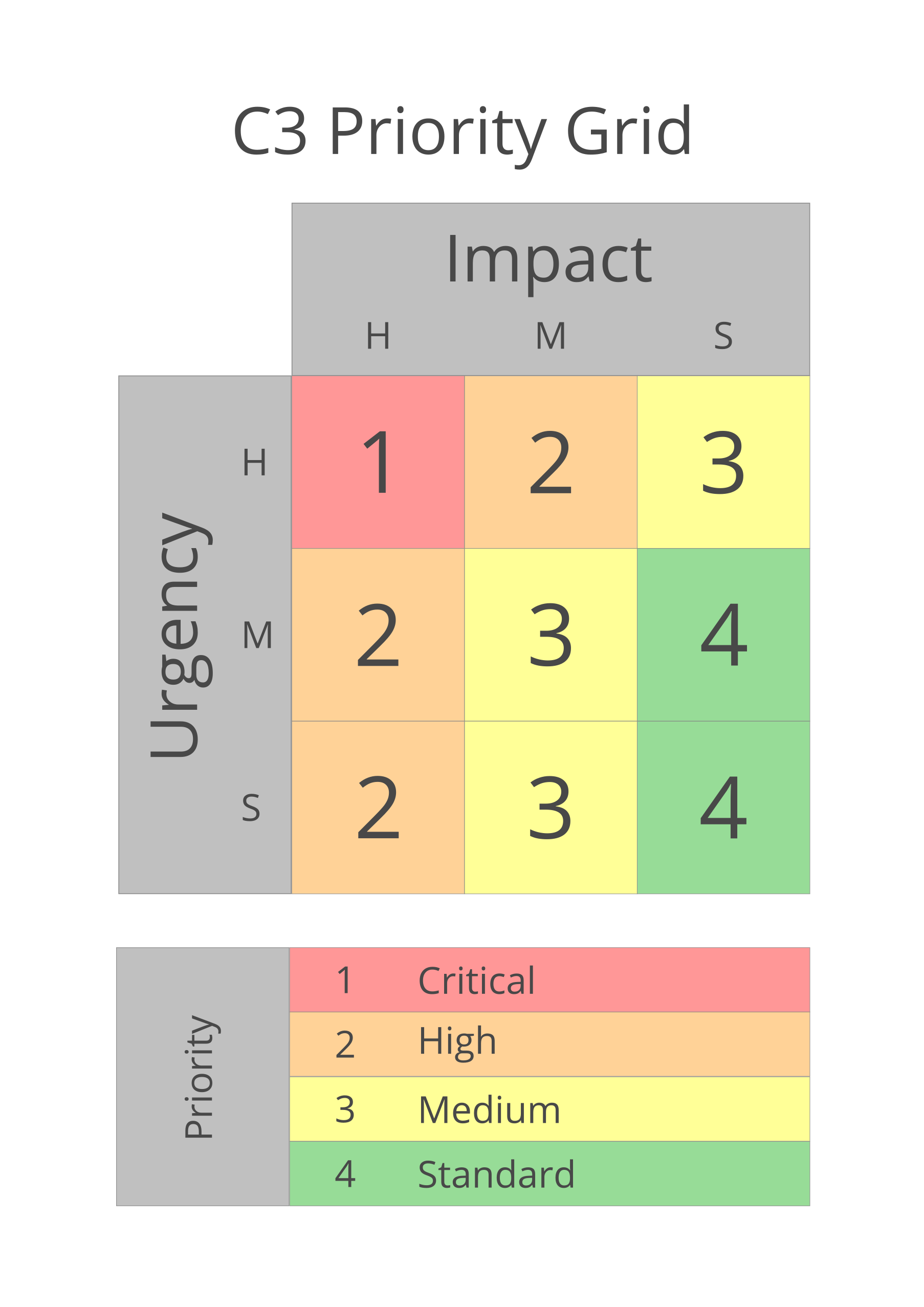
From the Impact & Urgency assessment described above, we can then put a relative priority on any given service request. If we create a grid with impact levels across columns and urgency down rows, we can establish a relative priority for each incident. The image below shows C3’s adaptation of the ITIL/ISO 20000 grid. Please notice that we have dispensed with “priority 5” and we take urgency more seriously than the ITIL recommendation. This stems from our vision and philosophy that is our desire to help our customers as quickly as possible.
Priorities and Goals
When we assess a ticket and assign a priority to that service request, we are also setting goals for ourselves. We aim to respond to incidents within a timeframe for a priority. We also aim to begin work on a ticket within a timeframe for a priority. Below is a table outlining our goals for each priority of ticket.
| Level | Response Goal | Work Goal |
| 1-Critical | 0.5 Business Hours (3 after-hours) |
1.5 Business Hours (5 after-hours) |
| 2-High | 0.5 Business Day | 1 Business Day |
| 3-Medium | 2 Business Days | 3 Business Days |
| 4-Standard | 3 Business Days | 5 Business Days |
| 5-Deferred | No Goal | No Goal |
You may notice a fifth level in that tabled called “Deferred.” In very rare occurrences, we have a service request or ticket that does not have any goals associated with it. This is most often done at the request of the customer, and later, the priority might be raised. We use this level to “keep track of things” even though we won’t likely start work any time soon. Or, when the work is done intermittently with no urgency or impact considerations.
A Queue
As individuals, we all dislike it when we’ve been waiting for something and someone “cuts in line,” or “Jumps the line” (“jumps the queue” for our friends from across the Atlantic). It goes against common courtesy and it is downright “unfair” to those that have already been waiting.
At C3, when we get a service request, we assess its priority as described above. During that assessment, several “due dates” are then put on the ticket. One is the due date by which our customer should hear form us with indication that we’ve begun evaluating the problem in detail and that we’re gathering information on the incident. A second is a due date by which we must have significantly begun solving the problem. A third, and often missed due date, is the date by which we hope to resolve the issue. The last due date is tricky. Resolution goals can be difficult because the scale and scope of the problem determine how long an incident takes to resolve, not necessarily the Impact & Urgency. These due dates are calculated from the “timestamp” of our receipt of a service request. Then, every service request is put in a “line” or “queue” to be worked in order.
Our customers generally understand this queue and appreciate our process as a way of optimizing our service to them. While we do everything we can to help customers feel like they are our only customer, our customers are smarter than that, and they know they ought to wait for the queue to surface their request to the appropriate technician. Our customers wouldn’t be very happy with someone trying to “cut in line” in front of them in this queue just like they wouldn’t try to “jump the line” themselves in order to have their problem resolved more quickly. This works to everyone’s advantage and works pretty well, with one exception.
The Exception
There is one gigantic exception to this queuing system, however. There are a great number of our service requests that are fairly easy to resolve. These tickets are often resolved merely in our “response” stage of addressing the ticket. To defer the resolution of these tickets for the sake of making them stay in the queue only adds to the time it takes to resolve all tickets in total.
We mitigate the impact of this by only allowing one technician at a time to be actively responding to customer’s service requests through our TAC process. Many of the service requests that the TAC is responding to can be resolved quickly and during our first contact with the customer, so TAC is free to simply resolve these issues with one stipulation: TAC must be able to meet their due dates for responding to the customers. Even if a resolution is easy, if it’s going to take too long, TAC will “escalate” the ticket to another technician.
This exception reduces our overall time-to-resolution for all tickets by minimizing the amount of system overhead we put on these tickets. It’s part of how we manage such high ticket-to-technician ratios and high user-to-technician ratios.
Systems to Serve Customers
Ticket Priorities, Impact, Urgency, and Queuing systems like those outlined by ITIL and ISO 20000 are designed to help IT organizations serve customers. We at C3 use our own flavor of these systems to serve our customers. We rely on the system to guide us and good discretion to use the system to good effect and not as rigid restriction on our ability to serve our customers. We assess the Impact and Urgency of every service request and use that guide the priority we place on the incident. This, in turn, allows us to queue every service ticket in a way that it is approached and resolved in an equitable and timely fashion.
If you have any questions about this process, or comments about this page, please Contact Us, we’d be happy to chat with you about it.